
Installing the Jedi Knight from the original CD
My 64bit version of Windows is not able to run the original installer available on the CD, but it is possible to install and run the game manually. The first step is easy if you have some experince with file and directory (folder) manipulation. Create a directory where the game should be installed and create the following structure:
- CONTROLS - folder, copied from the GAMEDATA folder on the CD1 - all CTL files
- EPISODE - folder, copied from the GAMEDATA folder on the CD1, should contaion JK1.GOB, JK1CTF.GOB, JK1MP.GOB
- RESOURCE - folder, copied from the GAMEDATA folder on the CD1, should contain JK_.CD, RES2.GOB + VIDEO folder, see later, + RES1HI.GOB - see later
- RESOURCE\VIDEO - folder, copied from the GAMEDATA folder on the CD1 and the CD2 - all SMK files
- JK.EXE - file from the GAMEDATA/EXE folder on the CD1
- SMACKW32.DLL - file from the GAMEDATA/EXE folder on the CD1
So - just the movies come from the CD2. All the other interesting files come from the CD1. In addition, copy RES1HI.GOB file from the GAMEDATA/MININSTALL folder to the RESOURCE folder - the other file in the mininstall contains low quality sounds - not interesting. Beware: remove the "read-only" attribute from the files.
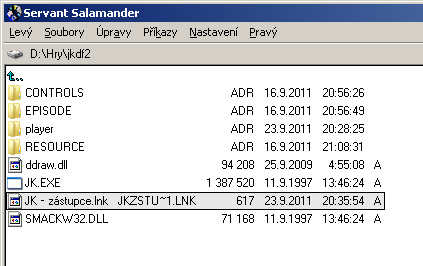
Ok, now, the trick is coming (two tricks actually):
1) ddraw.dll - copy to the game folder, can be downloaded from the original source: http://www.jkhub.net/project/get.php?id=1804 - it is in a zip which needs to be unzipped, or get from the Jedi Order. This step will make sure that graphics is not corrupted.
2) shortcut - create a shortcut to the jk.exe and on the "Shotcut" tab in the "Target" field, append " -displayconfig -windowgui" to the end. This should allow the game to start and load the menu.
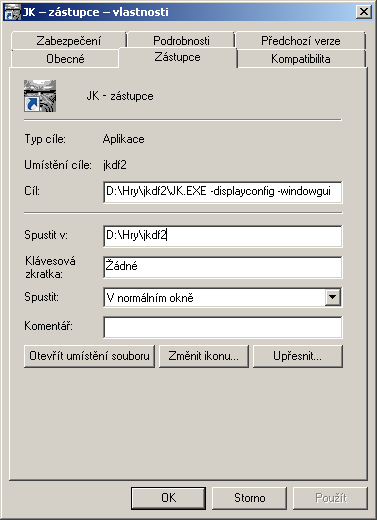
Do not worry about the windowed menu - when you load a level, the game will switch to the fullscreen mode - you can even select a widescreen resolution in the setup. I was also able to set some nice effects in the graphic adapter's control pannel and get even better results from 3D graphics in the game.
Note on the Windows Registry: it seems that the game is running without any records in the registry. I just read about some problems in multiplayer when registry is not set, but singleplayer should be ok.
Note on the Steam version: I think you just need to use ddraw.dll and make the shortcut. Files should be organized correctly already. I encountered no problems on Window 10 though.
Howto source: http://forums.steampowered.com/forums/showthread.php?t=1148126. The only difference is that PLAYER folder is not needed, it is created by the game.
Sorry if the howto is a bit brief at places. I welcome any tips and corrections. Sorry for the Czech version of screenshots - I do not have English Windows, but of course, if somebody sends me the English version, I will update the howto. Contact: majerco@seznam.cz